AndroSpectro Lite -
Create a visual image from the sounds around youExport the spectro to Matlab!
Create a visual image from the sounds around you.
Free Version Features:
* Multi-Touch Zoom/Pan * Display up to 3 minutes of continuous recording * Save as Image * Load previously saved Images * Change Spectrogram Colors * Easy Auto-Level / Max-level
Paid Version Features:
* Set Sampling Frequency/Window Size/Window Type * Show dB/Amplitude * Spectrogram smoothing * Export data to Matlab
What is a Spectrogram?
Every signal is a combination of unique frequencies, and can be disassembled into its frequency components. ("Frequency Spectrum")
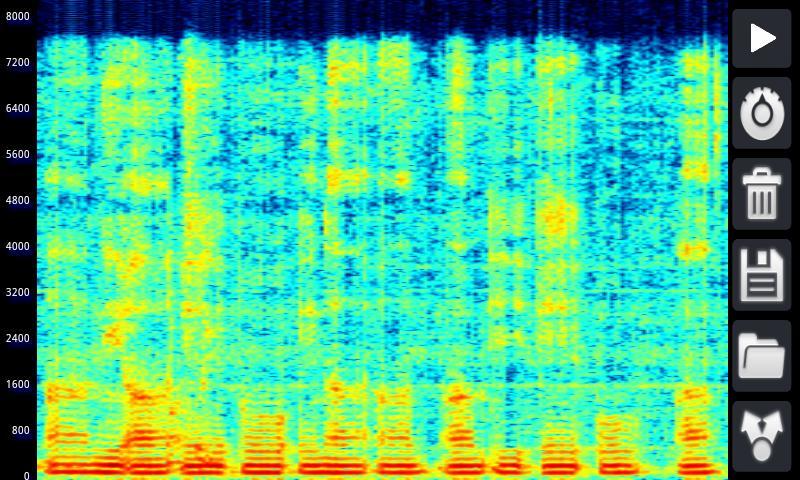
A Spectrogram is a technique that is used in Audio Analysis (Spectral Analysis) to see the real-time behaviors of signals. It plots the frequency components of the signal over time.
The bar on the left shows the frequency (in [Hz]) and the color is the intensity of that frequency.
Why AndroSpectro?
For non-techies - AndroSpectro is the simplest spectrogram app available. Just press the "Play" button. Feel free to Zoom-in/Pan using multi-touch gestures. You can also easily set the Maximum level or press 'auto' for auto-leveling.
For techies - AndroSpectro gives you control over every parameter you can think of. Display up to 3 minutes of continuous recording history and save as an image for later viewing.
For mega-geeks - Export the raw Spectrogram data to Matlab for further analysis. Your phone becomes your handheld input device for advanced audio analysis. (We wish we had it as a student)
Goto http://androspectro.com/matlab for more info
Please give us feedback so we can improve the app!
Thanks,
The AndroSpectro team
PS: The application uses permissions to track anonymous usage statistics. These are used to track bugs and improve your experience.
What's New in the Latest Version 1.41
Last updated on Sep 13, 2015 * Much faster load time* Now supports real-time(!) orientation changes (Portrait/Landscape)
* Share Spectrogram image via email
If you are experiencing problems with the app, please contact us at [email protected] or send feedback from within the application. Thanks!